
Kingdom Come Deliverance 2: Complete Console Commands and Cheats Guide

If you're finding *Kingdom Come: Deliverance 2* a bit too challenging, using console commands might be the perfect way to ease your journey through medieval Bohemia. Below, I've compiled a comprehensive list of console commands for the game and detailed instructions on how to use them.
Table of Contents
- How to Use Console Commands in Kingdom Come: Deliverance 2
- All Kingdom Come: Deliverance 2 Console Commands and Cheats
- All Item IDs
How to Use Console Commands in Kingdom Come: Deliverance 2
Before you dive into the world of cheats, keep in mind that console commands in *Kingdom Come: Deliverance 2* are exclusively for PC players. To activate them, follow these steps:
- Right-click on *Kingdom Come: Deliverance 2* in your Steam library and select "Properties."
- In the "Launch Options" field, type "-devmode" and click "OK."
- Launch the game and press the tilde key (`) to open the console window.
- Now you're ready to enter your desired console commands.
All Kingdom Come: Deliverance 2 Console Commands and Cheats
Here's a complete list of console commands you can use to enhance your gameplay experience:
| Console Command | Effect |
|---|---|
| wh_sys_NoSavePotion = 1 | Lets you save the game without using Saviour Schnapps. |
| wh_cheat_money [enter value] | Adds X amount of Groschen to your inventory. |
| wh_horse_StealCurrentHorse | Lets you instantly steal a horse without having to take it to a horse handler. |
| wh_rpg_OneShotKill = 1 | Enables one-shot kills for both you and your enemies. |
| wh_horse_JumpHeight = [1-200] | Increases horse jump height. |
| wh_horse_JumpGravityMult = [-0.1-1] | Adjusts horse gravity. |
| wh_pl_LockPickingShakeOverride = 0 | Disables shaking effect while lockpicking. |
| wh_pl_LockPickingDOF = 50 | Increases lockpick break time while lockpicking. |
| wh_ui_showHUD = 0 | Turns off the HUD. |
| wh_cheat_addItem [item ID] | Spawns an item based on the item ID. |
All Item IDs
For the "wh_cheat_addItem" command, you'll need item IDs. Here are some useful ones:
- Saviour Schnapps: 928463d9-e21a-4f7c-b5d3-8378ed375cd1
- Marigold Decoction: B38c34b7-6016-4f64-9ba2-65e1ce31d4a1
- Armorer's Kit: 167eb312-0e9d-4c2f-8ce3-56c32f5a84cb
- Tailor's Kit: 9f7a0c0a-6458-4622-9cc5-2f4dd4898b50
- Blacksmith's Kit: C707733a-c0a7-4f02-b684-9392b0b15b83
- Lockpick: 8d76f58e-a521-4205-a7e8-9ac077eee5f0
That's all you need to know about using console commands and cheats in *Kingdom Come: Deliverance 2*. For more tips and detailed information on the game, be sure to check out The Escapist.
-
 PUNCH TV delivers fast-paced fighting action to iOS and Android devicesExperience cooperative gameplay, 55 unique fighters with distinct move sets, and even rollback netcodeAn ideal choice for both newcomers and seasoned players seeking thrilling comAuthor : Connor May 31,2026
 -
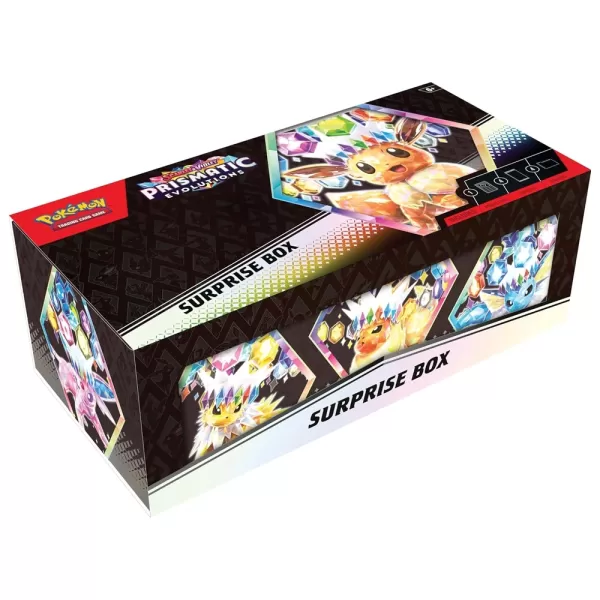 Amazon has restocked Pokémon TCG: Prismatic Evolutions Surprise Boxes at $59.99 today. But is it worth the price? Currently, the TCG community is divided between MSRP purists ($22.99) and collectors willing to pay the "market price" ($59.99).Since thAuthor : Liam May 31,2026


















- STALKER 2: Heart of Chornobyl - All Endings (& How to Get Them)
- Metaphor: ReFantazio - Complete Bond Guide
- NYT Hints and Answers: Guide to January 10, 2025
- Steampunk RPG Eldgear Unveiled by KEMCO
- Discover the Artifacts in Stalker 2: Locations and Acquisition
- Mushroom Go! Unleashes Co-op Dungeon Adventure for Fungi Fans