 Download
Rotation: A Comprehensive Android Screen Orientation Manager
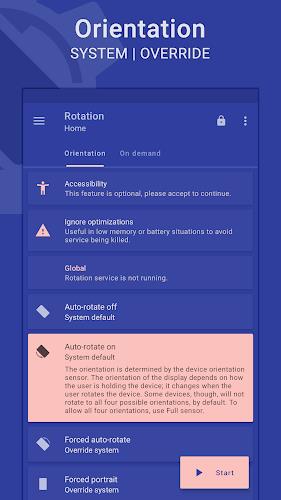
Rotation is a dynamic and highly customizable Android application designed to give users complete control over their device's screen orientation. Offering a wide array of options, including auto-rotate, portrait, landscape, and reverse modes, users can easily tailor the app to their specific needs. Beyond basic orientation control, Rotation allows users to define orientation based on various triggers such as incoming calls, device locking, headset connection, charging status, and even specific app usage.
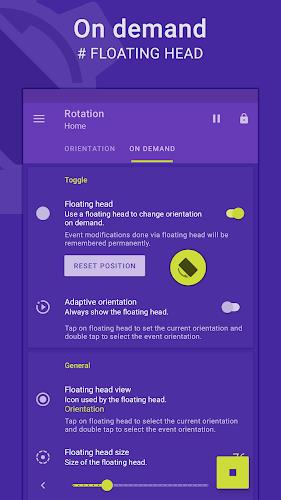
Key features include a convenient floating head, notification, or tile for quick orientation changes, a visually appealing theme engine that adapts to background colors, and robust backup and restore functionality. Supporting over ten languages, Rotation provides a truly global solution for managing screen orientation.
Key Features of Rotation:
- Flexible Screen Orientation Control: Manage and personalize your Android device's screen orientation with ease.
- Extensive Orientation Options: Choose from numerous modes including auto-rotate, forced portrait/landscape, reversed portrait/landscape, and sensor-based options.
- Event-Driven Orientation Changes: Configure orientation changes based on events like phone calls, headset use, charging, docking, and individual application launches.
- Intuitive Floating Control: Quickly adjust orientation using a customizable floating head, notification, or tile.
- Adaptive Theme Engine: Enjoy a visually consistent experience thanks to a dynamic theme engine that adjusts to background colors.
- Enhanced Functionality: Benefit from additional features such as auto-start on boot, notifications, vibration feedback, widgets, shortcuts, and seamless backup/restore capabilities.
In Conclusion:
Rotation offers a user-friendly and powerful method for complete control over your Android device's screen orientation. With its extensive features, customizable options, and intuitive design, Rotation delivers a truly personalized and seamless user experience. Download Rotation today and take command of your screen orientation.