
How To Kill All Mobs in Minecraft
Mastering Minecraft Mob Elimination: A Comprehensive Guide to the /kill Command
There are many reasons you might want to eliminate mobs in Minecraft. The most efficient method is using commands, specifically the /kill command. While seemingly simple, this command offers nuanced functionality. This guide explains how to use it effectively.
Prerequisites: Enabling Cheats
Before utilizing the /kill command, ensure your world has cheats enabled. Skip ahead if you've already done this.
The /kill Command: Syntax and Usage
The basic command, /kill, will unfortunately only kill the player. To target mobs, you need to add specific syntax.
To eliminate all mobs:
/kill @e[type=!minecraft:player] — @e selects all entities; [type=!minecraft:player] excludes the player.
Targeting Specific Mobs:
To kill all chickens, for example:
/kill @e[type=minecraft:chicken]
Adding Distance Restrictions:
To kill all mobs within a 15-block radius:
/kill @e[distance=..15] – Java Edition
/kill @e[r=10] – Bedrock Edition
To target a specific mob type within a radius:
/kill @e[distance=..15,type=minecraft:sheep] – Java Edition
/kill @e[r=10,type=minecraft:sheep] – Bedrock Edition
Minecraft autocompletes commands, so memorization isn't strictly necessary.
Key Entity Selectors:
Beyond @e, other useful selectors include:
@p– nearest player@r– random player@a– all players@s– yourself
Enabling Cheats in Minecraft:
Cheats must be enabled for these commands to function. Here's how:
Java Edition:
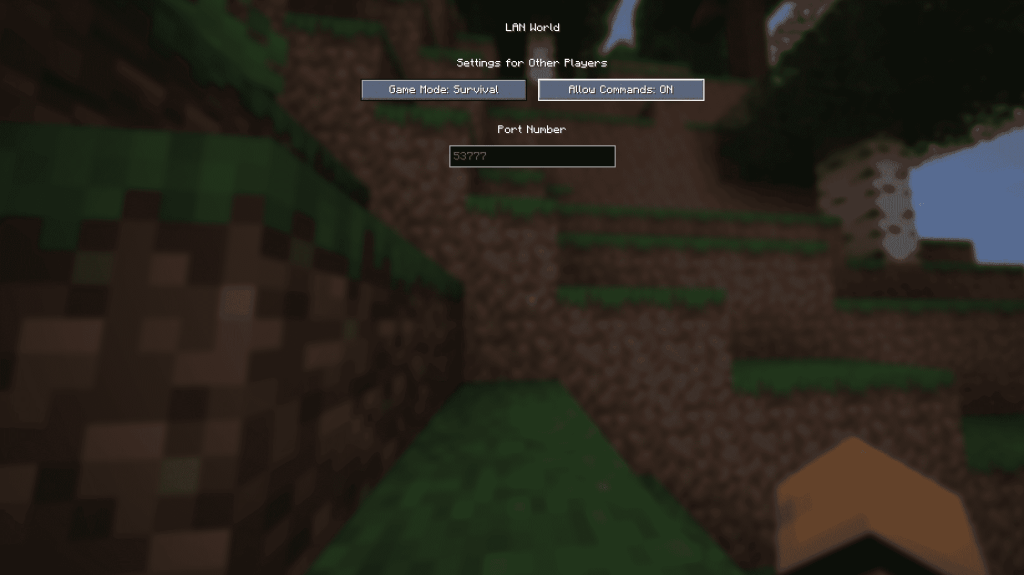
- Enter your world.
- Press Esc, then select "Open to LAN."
- Toggle "Allow Commands" to "On." This is temporary; you must repeat this each time you open the world. To permanently enable cheats, create a world copy with cheats enabled via the "Re-create" option in the Singleplayer menu.
Bedrock Edition:
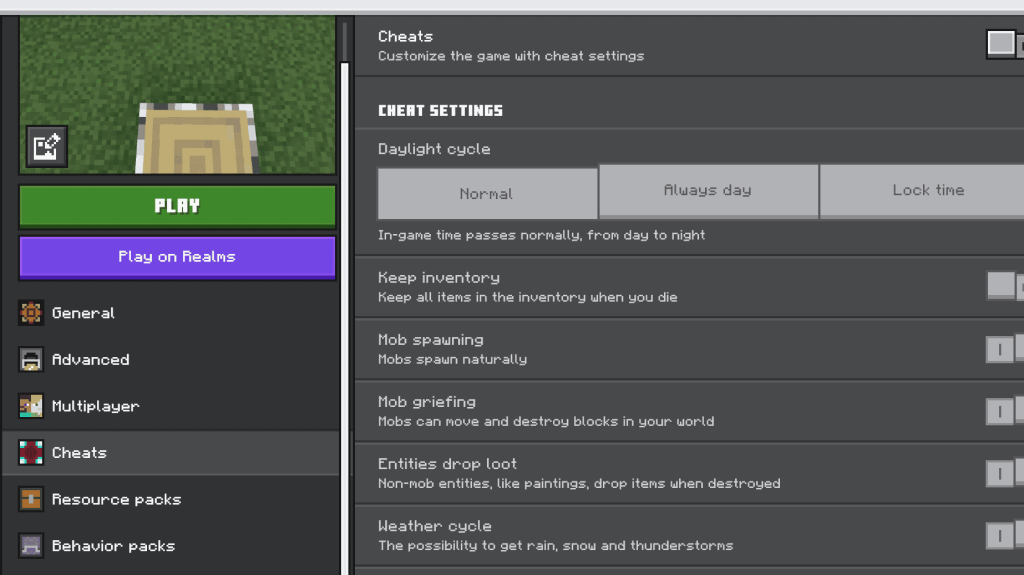
- Locate your worlds.
- Select the world and click the pencil icon.
- In the settings menu, toggle "Cheats" to "On."
Minecraft is available on PlayStation, Xbox, Nintendo Switch, PC, and mobile devices.
-
Roblox has introduced a new licensing platform designed to streamline collaboration between Roblox creators and intellectual property holders such as Netflix, Lionsgate, and Sega. License Manager enables "eligible creators" to easily access approvedAuthor : Sarah Mar 27,2026
-
 Following the release of TankCraft – War Tank Battles, indie studio FunTankGames has launched its sequel, TankCraft 2: Hell Bosses War. The developer's other mobile titles include Tank vs Zombies: Tank Battle, Blocky Tank 3D: Noob vs Zombie, and StelAuthor : Anthony Mar 26,2026









- STALKER 2: Heart of Chornobyl - All Endings (& How to Get Them)
- Metaphor: ReFantazio - Complete Bond Guide
- NYT Hints and Answers: Guide to January 10, 2025
- Steampunk RPG Eldgear Unveiled by KEMCO
- Discover the Artifacts in Stalker 2: Locations and Acquisition
- Mushroom Go! Unleashes Co-op Dungeon Adventure for Fungi Fans